A car you have driven for a while holds a surprising amount of your life: your contacts, your home address, the code to your garage door and a link to your phone app. Clearing it takes a little time and a quiet spell in the driveway. Do it before the car leaves your hands, whether you are selling it, trading it in or returning it at the end of a contract.
What the car is holding
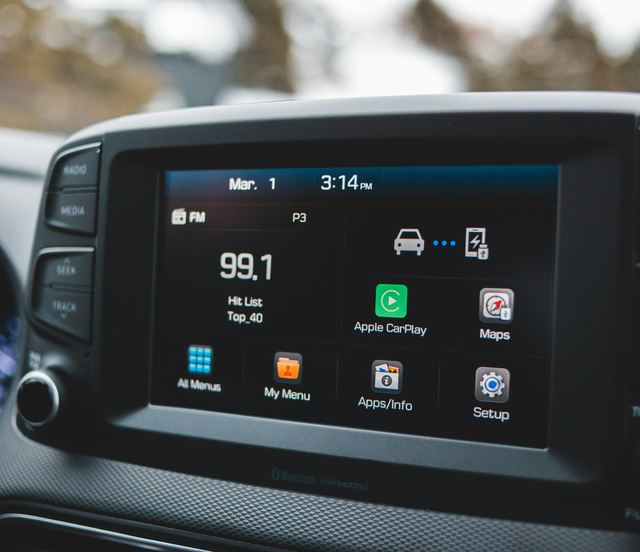
Go through the car's menus before you start, so you know what needs clearing. The touchscreen keeps a list of paired phones, along with the contacts, call history and messages each one shared. The navigation stores home and work addresses, recent trips and saved places, which together sketch out your daily routine.
Beyond that, the car may hold driver profiles with seat and mirror positions, logins for music or other in-car apps, saved Wi-Fi networks and voice settings. Built-in garage door buttons keep the codes they learned. And the carmaker's app links your account to the car, which can let you locate, lock or unlock it long after you have sold it.
- Paired phones, with their contacts, calls and messages
- Home, work and recent destinations in the navigation
- Driver profiles, app logins and saved Wi-Fi networks
- Codes learned by built-in garage door buttons
- The link between the car and your carmaker account
Untying the car from your accounts
Start with the companion app, because it is the link most worth breaking. Find the option to remove the car from your account, or to transfer it, and complete it with the car sitting outside your door. Until it is gone, the next owner may not be able to set up their own access, and you may still see the car's location.
Cancel or transfer any connected service plans so you are not left paying for a car you no longer own. Sign out of music and other app accounts on the touchscreen. If you linked the car to a charging network's account for automatic payment at the charger, remove the car from that account too, along with any toll tag registered to it.
Running the factory reset
Most cars have a reset in the settings menu, often under a heading such as system, general or reset. It returns the infotainment to its original state and clears the personal data stored there. Check the owner's manual beforehand, because some cars need the car switched on and parked, and some resets take a while to finish.
Delete the car from your phone's Bluetooth list as well, so your phone stops trying to connect to it. After the reset, go back through the menus and check that the phones, addresses and profiles are gone. If anything remains, delete it by hand, and ask the carmaker's service department if the reset will not complete.
- Remove the car from the companion app account first
- Run the reset from the settings menu, car parked
- Forget the car in your phone's Bluetooth list
- Recheck phones, addresses and profiles afterward
Garage doors, gates and the small things
Built-in garage door buttons keep their codes through many resets, so clear them on their own. The owner's manual explains how, and it often involves holding certain buttons until a light changes. Do the same for any gate or parking barrier the car has learned, and consider resetting the opener at home as well.
Then search the cabin as a stranger would. Look in the glovebox, the door pockets, the center console and under the trunk floor for charging cards, parking permits, receipts with your address and old service paperwork you meant to keep. Remove a toll transponder, a memory card from a dash camera and any USB drive left in a port.
- Charging cards and any toll transponder
- Parking permits and receipts with your address
- A dash camera memory card or a USB drive
- Personal papers in the glovebox or console
Handing over keys and paperwork
Gather every physical key before the handover: each key fob, any key card and a valet or spare key. If you used your phone as a key, remove that digital key from the phone and the account, as the article on digital keys describes. Leave the owner's manual, the charging cable supplied with the car and the service records in the car.
If the car has already gone and you forgot a step, it is not too late to act. Contact the carmaker to remove the car from your account and end any connected services. Change the code on your home garage door opener, and delete the car from any charging or toll account you can still reach.
What to take away
- Remove the car from your app account before it leaves you
- Run the factory reset, then check that it worked
- Clear garage door buttons on their own; resets can miss them
- Hand over every key, and take every card and paper out
Try it while parked
- Find the factory reset option and read what it clears
- List every phone stored in the car's Bluetooth menu
- Look up how your manual clears the garage door buttons
- Open the navigation's saved and recent destinations
- Search the glovebox and console for cards and papers
Questions
Some dealers do, but treat that as a bonus rather than a plan. The data is yours, and the companion app link is something only you can remove from your account. Clearing everything yourself before the handover lets you know it has been done.
A factory reset clears settings and personal data, but in most cars it does not roll back the software version. The car keeps the updates it has received. The owner's manual explains what your car's reset clears and what it leaves in place.
Delete their phones and addresses, clear the garage door buttons and run a factory reset. Then contact the carmaker to set up your own account and ask them to remove the car from the previous owner's account if it still appears there.