
A test drive in a used electric car is quieter than most, which makes it easier to notice what matters. Beyond the ordinary checks, it is your chance to see the car charge, watch the climate system draw on the battery and find out how current its software is. Plan the drive so each of those gets a turn.
Set it up with the seller
Arrange the drive for a time when neither of you is rushed, and ask for the car to be partly charged rather than full. A partly charged car can show you that it accepts a charge, and you can still drive far enough to learn something. Ask the seller to bring the charging cable and any adapters that come with the car.
Agree on a route before you set off, and include somewhere you can plug in: the seller's home charger, a curbside charger or a fast-charging station nearby. Bring your phone and a notepad, and photograph the charging screen before you leave so you have a starting point to compare against.
- Partly charged, not full
- The charging cable and any adapters in the trunk
- A place to plug in somewhere on the route
- A photo of the charging screen before you leave
Plug it in during the drive
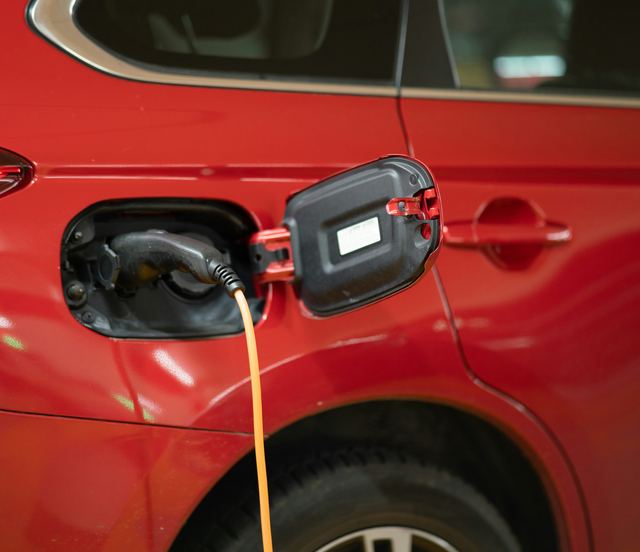
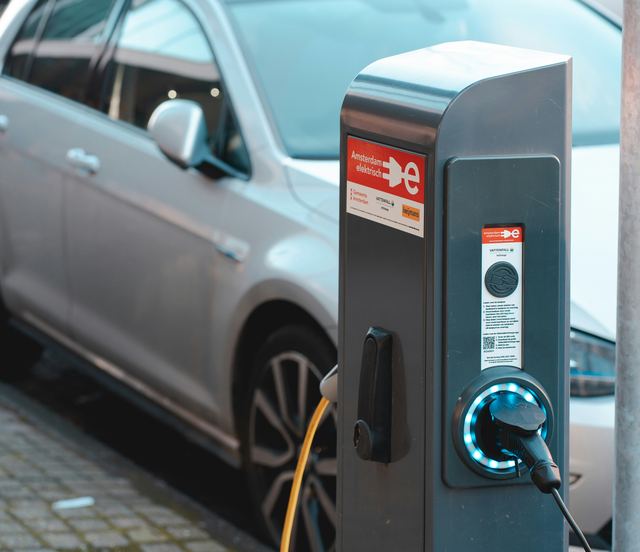
Charging is easy to leave out of a test drive, and it is the part of the car you will use every week. Plug in and watch what happens: the car should recognize the connector, lock it in place and show on the charging screen that energy is flowing. A short session will not tell you much about speed, so look for a clean start instead.
If the car can fast charge, try a fast-charging station when the route allows, since a home charger only tests the slower side. When the session ends, check that the connector releases cleanly and that the charge port door closes and latches. A session that will not start, stops on its own or will not release is a question for the carmaker's service department.
Run the heat and the cooling
An electric car heats and cools the cabin from its battery, and on a used car that system deserves a proper workout. Turn the heat up, then the air conditioning, and give each one time to work. Try the seat heaters, the steering wheel heater and the windshield defrost if the car has them.
Watch the range estimate while you do it. Most cars show a drop when the heat comes on, and that is ordinary. Listen for a fan or compressor that sounds strained, and notice whether the air smells damp or musty. Some cars have a heat pump, and the owner's manual explains how it works on that model.
- Heat turned all the way up, then the air conditioning
- Seat, steering wheel and windshield heaters
- Any damp smell or strained noise from the vents
Feel the regenerative braking
Regenerative braking slows the car by letting the motor recover energy, and most electric cars let you choose how strongly it acts. Try each setting the car offers, including any mode that brings the car nearly to a stop when you lift off the accelerator. The slowing should feel smooth and steady, without a jerk or a change in behavior from one stop to the next.
Use the brake pedal too. On a quiet stretch where it is safe, brake firmly once and notice whether the car drifts sideways or the pedal feels soft. Grinding, juddering or pulling belongs with a qualified technician before you decide. The article on regenerative braking explains the settings in more detail.
- Each regenerative setting the car offers
- Any mode that slows the car nearly to a stop
- One firm stop with the brake pedal where it is safe
Look through the screens and the software
Before you move off, spend time with the touchscreen and the instrument cluster while parked. Check that the screen responds quickly, that the rear camera shows a clear picture and that nothing flickers, freezes or restarts. Pair your phone now rather than on the road, and never handle the phone while the car is moving.
Find the software version in the settings menu and photograph it. The carmaker's service department can tell you whether that version is current for the car and whether any update is waiting. A car that has fallen well behind may have missed fixes, which the article on recalls and software history covers.
- Screen response, camera picture and any flicker or restart
- Phone pairing done while parked
- The software version photographed from the settings menu
What to take away
- Ask for the car partly charged so you can watch it charge
- Run the heat and cooling and watch the range estimate move
- Try every regenerative setting and one firm stop
- Photograph the software version before you hand the car back
Ask the seller
- Can the car be partly charged rather than full when I arrive?
- Can we plug it in somewhere during the drive?
- Which regenerative braking setting did you usually drive in?
- Does the car have a heat pump?
- Which software version is the car running now?
Questions
You can, but you learn less. A car that will not charge properly has a serious problem, and plugging it in once is the simplest way to find out. If the route has nowhere to plug in, ask to do it at the seller's home charger before or after the drive.
The heat comes from the battery, so the car recalculates how far it can go with that load running. A drop is ordinary. A drop that seems out of proportion, or a climate system that struggles to warm the cabin, is worth raising with the seller.